HFLINK News About ALE
HF Digi Messaging
Emergency Comm
Get Started ALE
ALE Software
HFLINK is the international resource for ALE Automatic Link Establishment High Frequency Communications
HF Digital Messaging - Emergency / Disaster Relief - Interoperative Communications - Ham Radio

HFLINK

ALE HF Communications
High Frequency Network
HFLINK Group


ALE HF Communications
Global HF Network
HFLINK Group Forum
Propagation Now
Ham Radio ALE
ALE On Air Now
ALE Frequencies Join HFLINK Free Read HFLINK Forum

PC-ALE SOFTWARE ALE CONTROLLER FOR PC COMPUTERS Member Store


HFLINK Home
HFLINK News
More HFLINK News
Join HFLINK Group - Free
Member Store
Automatic Link Establishment
Ham Radio ALE Operating
Ham Radio ALE HF Network 
ALE Channel Frequencies
ALE Software & Download
ALE Transceiver Info
ALE Antenna Info
ALE Comm Standards
ALE Technical Info
Ham Radio Bandplans
HF Propagation Now
ALE Geo Position Report
ALE Interoperable HF Comm


Charles Brain G4GUO - Author of PC-ALE Software
Charles Brain G4GUO
author of PCALE software.

About PCALE
Charles is to be commended for his wonderful generosity and technical achievement. Through PCALE, he effectively opened up ALE to the non-professional radio operator at very low cost. The availability of PCALE in various improving versions over many years has made it possible for more radio operators to use ALE than ever would have been possible.
We urge you to visit the extensive website of Charles Brain.


If you like the PCALE software and are interested in sending a donation, HFLINK encourages all PCALE users to make donations to Charles Brain. All donations are entirely optional. Click on the Paypal Link to donate:


DOWNLOAD PCALE NEW VERSION
PC-ALE
Beta
Download: PCALE Software New Version
The new Beta version includes the latest features and new radio support, with Quiet Relay Scanning and Sounding.
For HFLINK Members:
Please use your yahoo ID and Join HFLINK to get free access to the PCALE Software New Beta Version download.

ALE  TESTING
ALE audio testing ALLCALL and AMD Text message with HF noise
2.7Mb wav audio file
ALE TESTING
ALE audio testing ANYCALL with HF noise
1.9Mb wav audio file
Important: Please send all questions or problems with the software or files to: HFLINK Group Forum.
Please DO NOT send your problems/questions to Charles G4GUO.

PCALE Beta Download: v1.062H beta (for HFLINK members, use your Yahoo ID)
Also, Download the QRG file for your geographic area:
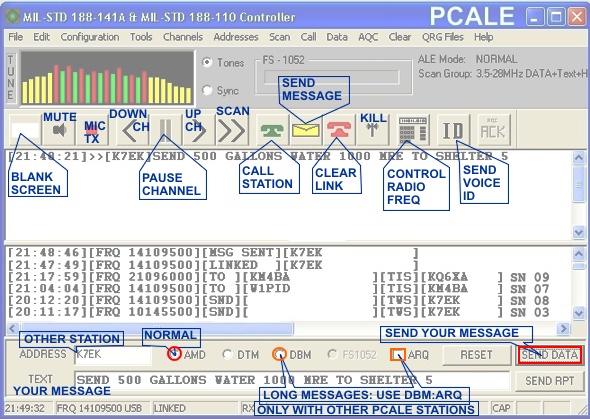
PCALE requires a QRG fill file for proper operation. These QRG fill files contain all ALE channel frequencies and other parameters for using PCALE on ham radio ALE channels. After you load the QRG file into PCALE, you may select the bands and channels for your operating requirements by the Channels>Select Scan Group menu in PCALE.
Download QRG File
DOWNLOAD QRG FILE - IARU REGION 1
IARU Region 1

Europe
Africa
Russia
Mid-East

Download QRG File
DOWNLOAD QRG FILE - IARU REGION 2
IARU Region 2

USA
Canada
North America
South America

Download QRG File
DOWNLOAD QRG FILE - IARU REGION 3
IARU Region 3

Asia - Pacific
Japan
Australia
New Zealand


INSTRUCTIONS:
1. Make a new folder (directory) in your computer named PCALE.
2. Download and unzip the PCALE software into the PCALE folder.
3. Download or save the QRG FILE into the PCALE folder.
4. Run PCALE software.
5. In PCALE, *carefully follow* these steps:
6. At the top: "QRG FILES">LOAD QRG FILE>
7. Browse, find, and double-click on the QRG FILE.


LOAD YOUR CALLSIGN:
Follow these steps VERY CAREFULLY to set up your Own Callsign (Own Address).
1. PCALE, at the top: "ADDRESSES">MODIFY>OWN>Select Address>NOCALSIGN>OK
2. Double-click on NOCALSIGN.
3. NOCALSIGN should now be highlighted.
4. *Type your callsign*. Press OK.
5. Main top menu screen: "ADDRESSES">LIST>OWN> view the list, it should have your callsign in the OO line.
6. If Step 5 fails, repeat procedure starting at LOAD YOUR CALLSGIGN Step 1.
7. If this succeeds, you are ready for scan group testing and operation.

PCALE Set Up - Configuration - Information CLICK HERE
CLICK HERE for PCALE Configuration Set Up Information


Background of PCALE Development...
PCALE author, Charles Brain G4GUO, says:

"Some years ago I started on the development of an ALE system for the P.C. This started as a training exercise in DSP and grew from there. I have been amazed at the massive amount of interest this software has generated from all around the world."
"Since writing the above I have now restarted work on this because I am using it to provide a backup orderwire for my digital voice experiments. The software has become quite popular in the Utility listening community. I am gradually adding new radios but this has to take second place to my more commercial work."
"I have recently entirely re-written all the signal processing modules and those of you used
to previous versions of the software hopefully will find from version G onwards a significant improvement in performance. The software is now totally free of any Intel DSP code."

"Warning, I will not accept responsibility for any damage to your equipment through use of this software. When using this software use an Automatic Antenna Tuner and run the transmitter well below rated output. It is advisable to go through a tune sequence on
each of the operating frequencies before handing control of your radio to the computer.
You have been warned."


Back to Top
About HFLINK
HFLINK HOME
Join HFLINK - Free


END OF PAGE

©2000, 2001, 2002, 2003, 2004, 2005, 2006, 2007 HFpack Inc. All Rights Reserved.

HFLINK, HF-LINK, HF LINK, and the HFLINK Logo are trademarks of HFpack Inc. Any external hyperlinks must only be to the main page of the HFLINK.COM website http://hflink.com . Capture of the HFLINK website or any part of it within the frame of another website is not permitted. HFLINK group forum is a private group. Public archiving, forwarding, or open display on the internet of HFLINK group forum or messages is forbidden. All text and images on the HFLINK website are property or copyright HFpack Inc, or when used by permission, are copyright by their respective owners, with all rights reserved.
HFN and High Frequency Network are service marks and trademarks of HFpack, Inc. No part of the HFLINK website or HFLINK Group Forum may be used or copied without written permission of HFpack Inc.


HFLINK is the international resource for ALE Automatic Link Establishment High Frequency Communications, HF Digital Messaging, Emergency / Disaster Relief, Interoperative HF Communications, HF Network, Ham Radio.